
A subway station can have the right tiles, signs and fluorescent lights and still be wrong for the scene. If someone is leaning against a wide pillar, replacing it with a narrow post changes the action as well as the location.
Before you use AI to change a video background, look at what the person touches and what passes in front of them. Some of the setting is doing more than filling the space behind the subject.
Inspect a scene side by side →
Decide whether you want a new place or a new look
A different time of day can change the mood without moving the scene. A new street, room or coastline changes its geography. Those are different requests.
Write down what you want a viewer to notice. Perhaps the room should feel warmer. Perhaps the performance should happen in a station instead of a corridor. That choice affects which details you will need to compare.
You may also discover that the place should stay. In OopShort's riverside comparison, the character and outfit change while the basalt cliffs and riverside setting remain the reference points.

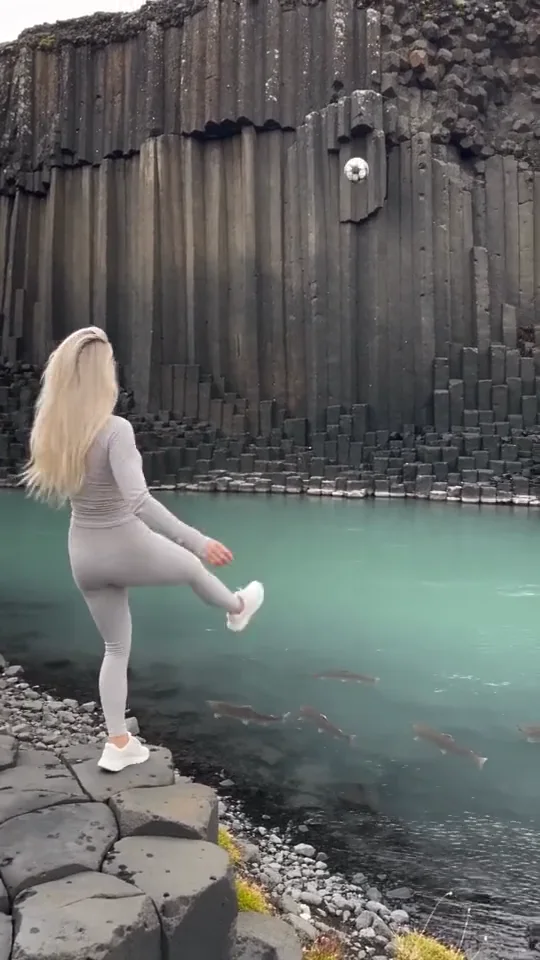
This comparison shows a location kept intact while the subject changes. Use the cliffs to compare the two clips, then look at the subject. It makes the scope of the edit easier to see.
Notice which surfaces support the action
An empty wall may be scenery. A wall someone pushes against is part of the performance.
The same applies to a chair, a stair, a windowsill or the edge of a vehicle. If you change its height or shape, the person's pose may stop making sense. A hand can appear to grip air even when the new room looks convincing.
Before choosing a different location, identify the surfaces that carry weight or establish distance. You don't need to name every object in the shot. You do need to know where the person stands, sits, leans or lands.
For a hypothetical station scene, that means asking whether the new architecture still fits the movement. The name of the station matters less than the position of the support.
Check the foreground, too
"Background" sounds like everything behind the person. In a moving shot, the layers can change.
A railing may pass in front of a sleeve. A pedestrian may cross the subject. A car window may show both a reflection and the person inside. Those are useful moments to inspect because they reveal how the subject belongs in the new place.
Look at the edges as they move. Hair should not carry a strip of the previous wall. A gap between an arm and the body should not reveal a different location. A passing object should remain clearly in front or behind.
Judge these transitions in motion. A paused frame can hide how an edge flickers from one state to another.
Light has to make sense on both sides of the edge
A warm evening street and a brightly lit face can each look attractive on their own. Together, they may suggest two different times of day.
Compare the direction and softness of the light on the person with the new surroundings. Look at the ground near the feet. In a shot with glass or polished surfaces, also look for an old reflection that no longer belongs.
You may not need to change the location to get the mood you want. OopShort's sunset riding example changes the light alongside the rider and horse, while keeping the riding action and camera angle as the comparison.
Choose a scene with the right scope
A prepared scene can be useful when its example already fits your idea. Check the setting, framing and material requirements on the published scene page. A scene that accepts a portrait does not automatically give you a general video background editor.
If you need to keep your own footage, confirm that the tool you choose accepts video and supports the kind of edit you need. If you want a finished scene with your character in it, start by finding that scene.
OopShort's examples show creative results. Explore shows which scenes are published and whether creation is currently available. Check the offered format, uploads and displayed credit cost there before starting.