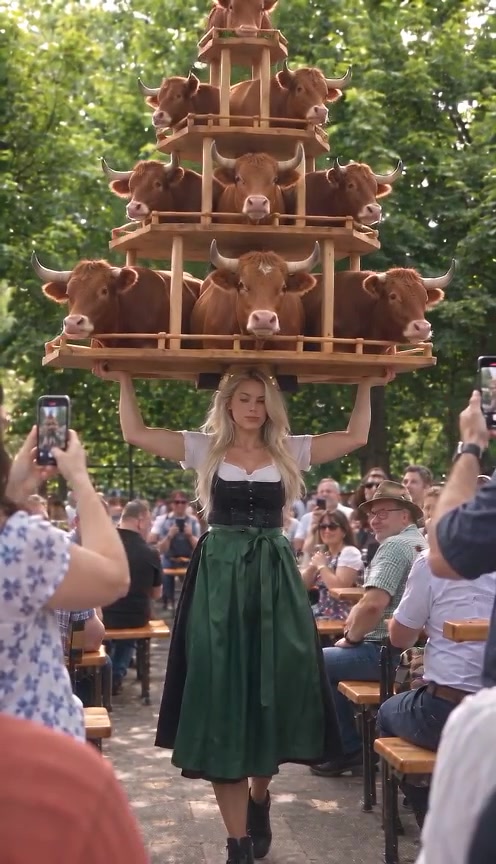
Video object replacement changes an object inside a moving scene. In this prepared object-stack template, your photo changes the objects on the tower while the scene supplies the performer and carrying action. It does not accept your own video for editing. Watch the example above, then choose an object whose shape or color makes the joke work.
Preview the object replacement template and availability →
The change you are making
This scene changes the appearance of the objects on the carried tower. It follows the existing performance and camera movement. Your replacement image describes the object; the scene supplies the person and location.
Pick an object whose shape or color will make the tower funny or recognizable. If your idea depends on a different performer or a new carrying action, look for a scene that offers those changes.
The original Instagram reference gives the source context. Its creator labels the post as AI content. The video above is OopShort's published remix example; the scene page shows the current version and material requirements.
Choose the photo for the detail you care about
A whole pineapple and a small drink can both have a clear silhouette. A detailed label on a tiny bottle asks the viewer to notice much more.
Before choosing your image, finish this sentence: "Someone watching on a phone should recognize the ____." If the answer is the shape, show the full outline. If it is the color, use a photo where the color is clear. If it is a logo or printed label, check the moving example before relying on small lettering to carry the idea.
Keep the whole object visible. A clipped top or hidden handle leaves less of its defining shape in the photo.
Use an obvious subject. One object against a simple background is easier to inspect than a shelf full of similar products.
Choose a useful angle. A straight-on package photo may show a label well; a slight angle can show the depth of a round object. Use the view that makes your choice recognizable.
Check the file. The current scene accepts one JPG, PNG or WebP up to 5 MB. Follow the scene's displayed requirements if they change.
A distinctive outline is a practical starting point for your first test. Small text and transparent surfaces give you more to check in the result. A clear photo helps you evaluate the attempt; it does not guarantee a successful generation.
Make your version in the published scene
Open the object-stack scene. Play the example through the walk past the camera so you can judge the movement as well as the opening.
1. Choose the replacement object. Decide which visible feature makes the idea work, then select a photo that shows it clearly.
2. Check the scene's scope. The upload controls the objects on the tower. This scene does not accept an arbitrary video for editing.
3. Review the output and cost. Read the object-stack template's current duration, resolution, audio and Credits per generation. Check the live listing before confirming a generation; these details can change between template versions.
4. Check availability. The template page shows whether generation is available. You can inspect the example while creation is paused. When it is available, sign in, add the requested image and check its preview and displayed cost before continuing.
If you need the account and credit steps, read how OopShort works. Check that the scene is available before buying credits for it.
Where to look in the result
Start with the outline. Does the replacement remain the same kind of object as the tower moves? A shape that changes halfway through may lose the joke even if the opening looks good.
Next, watch the support. Look at the base of the carried stack and where the performer meets it. The scene is deliberately exaggerated, but you should still be able to follow what the performer appears to be carrying.
Finally, watch the object as it passes across the background or another part of the stack. Notice an edge that melts into its neighbor, a part that disappears or a label that changes. Replay at normal speed afterward. The clip needs to read clearly when someone watches it once.
Make the next attempt answer one question
If the object is hard to recognize, a clearer view or simpler background is a reasonable next test. If a label is the problem, decide whether the idea still works through shape and color. You may not need the lettering at all.
For your first variation, keep the same object and change the photo. That gives you something specific to compare. Trying a new object, crop and visual idea at once makes it harder to decide what helped.
Use the displayed credit cost to decide whether another version is worth making. Watch your first result before deciding on another attempt. If you need exact product lettering or a different physical interaction, assess whether this scene can serve that requirement before paying for further versions.